
sip-all.pstnhub.microsoft.com FQDNs will not be valid anymore
Microsoft has sent a message to its customers alerting that sip-all.pstnhub.microsoft.com FQDNs cannot be used anymore in SBC configuration for Teams Direct Routing (starting from the 1st of March) and it should be removed. Instead, all SBCs should be configured to communicate with the subnets (52.112.0.0/14 and 52.120.0.0/14).
This can be found clearly on the link:
Filipp Seljanko on LinkedIn: #microsoft #directrouting #microsoftteams | 12 comments
This is reflected in Microsoft documentation:
Plan Direct Routing – Microsoft Teams | Microsoft Docs
There is no mention of sip-all.pstnhub.microsoft.com anymore. It is replaced with subnets (52.112.0.0/14 and 52.120.0.0/14).
On Ribbon SBC Edge (SBC 1000, SBC 2000, and SBC SWe. Lite)
On the Ribbon SBC Edge family of SBCs (SBC 1000, SBC 2000, and SBC SWe. Lite), you need to change the Federated IP/FQDN as follows:
-
Go to Settings Tab. On the left pane, expand Signaling Groups. Select Direct Routing Signaling Group (it is named by the wizard (ScenarioName: Teams Direct Routing)

-
This will show the details of the Signaling Group on the right pane

-
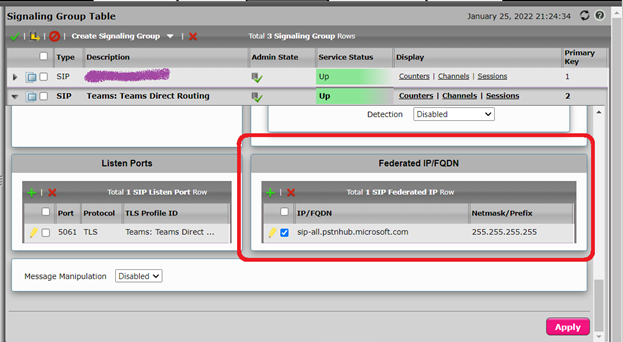
Scroll down the details until you reach Federated IP/FQDN
-
Select the check box next to sip-all.pstnhub.microsoft.com and click on the red X to delete this entry
-
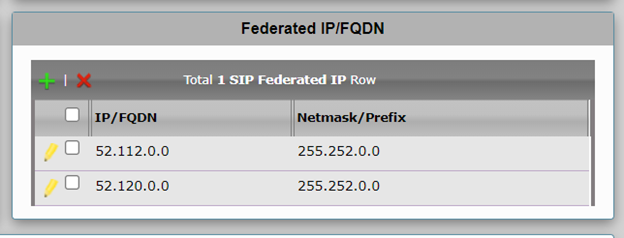
Click on the green + to add (IP/FQDN 52.112.0.0 with the mask 255.252.0.0) and then click on OK. With the same method add (IP/FQDN 52.120.0.0 with the mask 255.252.0.0)
-
On the details of the Signaling Group, click on the “Apply” button
I assume this will be reflected in the “Easy Config Wizard” in the future versions of the firmware of the SBCs.